Mobile Info
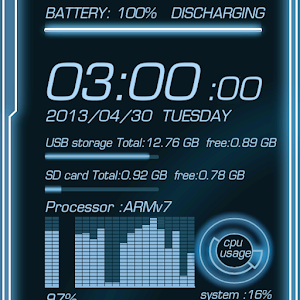
画面上部(バッテリー容量表示バー付近)をタップするとバッテリーの明細を、画面左下タップでネットワークの明細を、右下タップでメモリ容量とCPU状況を表示します。
このライブ壁紙は表示のみでネットワーク等の設定変更は行いません。また、外部とのパケット通信は一切しませんのでご安心してお使い下さい。
ADW.Launcher 等のランチャーアプリと組み合わせるとホーム画面を増やせたりアイコンやタスクバーを非表示に出来たり、回転表示ができたりと、フル表示でこのライブ壁紙をお使い頂けます。
About Mobile Info
- Package name (App ID)
- jp.zeg.livewall.zeg103140
- Available on
- Google Play
- Price
- Free
- Version
- v2.1.2
- Developer
- Artem Chepurnoy
Looking for the Mobile Info APK?
The safest way to get Mobile Info (jp.zeg.livewall.zeg103140) on your Android device is to install it directly from Google Play — you'll always get the latest official version, automatic updates, and no risk of modified or infected APK files from third-party sites.
Secure & Private
Your data is protected with industry-leading security protocols.
24/7 Support
Our dedicated support team is always ready to help you.
Personalization
Customize the app to match your preferences and workflow.
Mobile Info の動作を見る


Frequently Asked Questions
Is Mobile Info free?
Yes, Mobile Info is free to download and install on Android through Google Play.
How do I install Mobile Info on Android?
Open Google Play on your Android phone or tablet, search for Mobile Info by Artem Chepurnoy or tap the Google Play button on this page, then tap Install. The app downloads and installs automatically.
What is jp.zeg.livewall.zeg103140?
jp.zeg.livewall.zeg103140 is the App ID (package name) of Mobile Info on Google Play. Every Android app has a unique package name, and it is the safest way to verify you are installing the official app.
Is Mobile Info safe to download?
Installing Mobile Info from Google Play is the safest option: you get the official version published by Artem Chepurnoy, verified by Google Play Protect, with automatic updates. Avoid APK files from unofficial third-party sites.
Get Mobile Info Today
Mobile Info for Android — free download on Google Play.
Compatible with Android phones and tablets — available on Google Play.